
$0
Unlimited single-channel live TV
Free unlimited single-channel viewing
Watch live HDHomeRun TV on Apple TV with a guide, favorites, channel surfing, captions, SAP, and 5.1 audio, without paying $39.99.
Opens the right store for this device · No server. No subscription. Multiview upgrade optional.
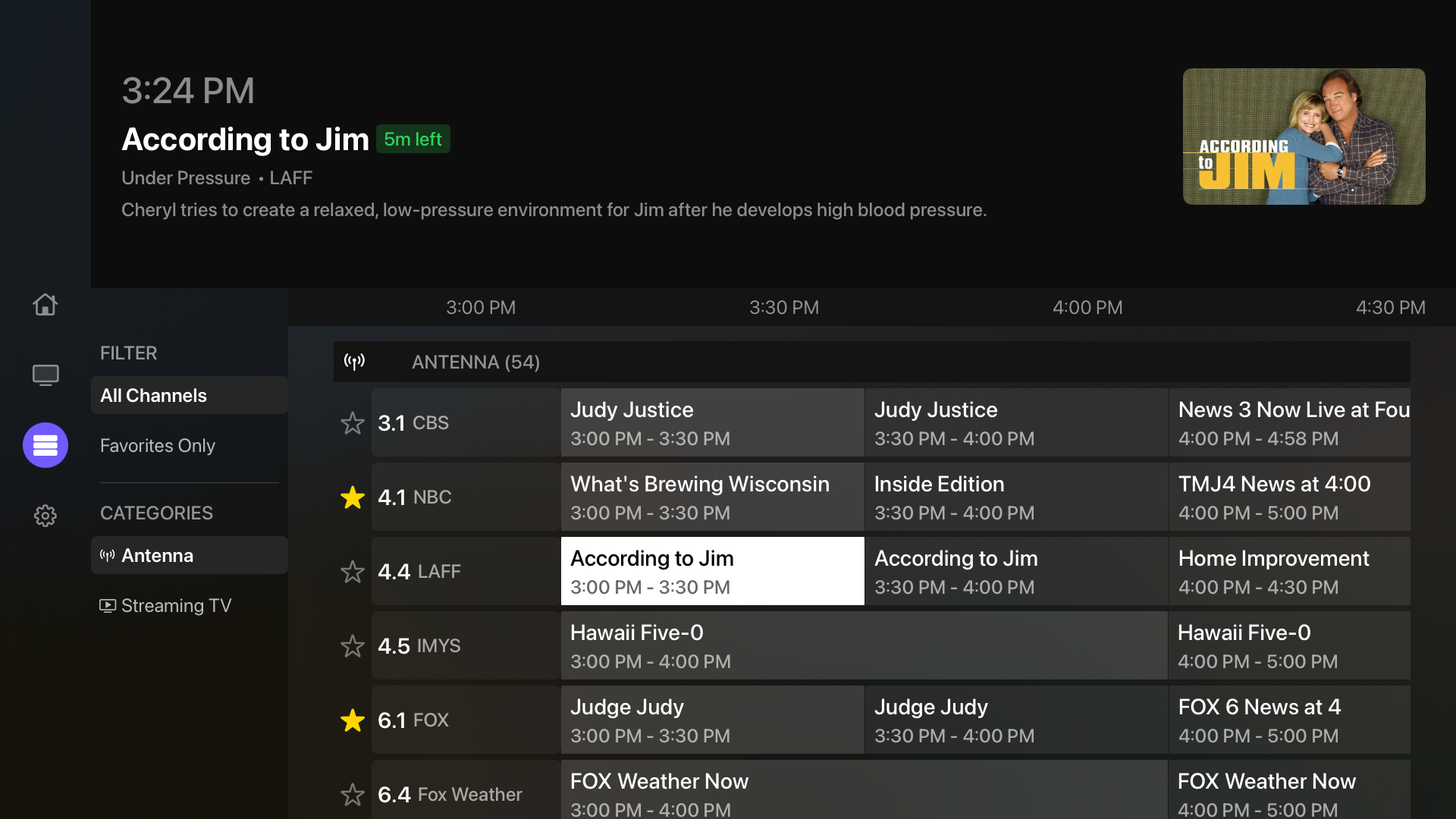
Your HDHomeRun. Your Apple TV.
Direct local playback. No middleman server.
Free means free
Connect Multiview directly to your HDHomeRun over your home network and watch one channel for as long as you like. The program guide, favorites, channel surfing, captions, audio selection, and 5.1 support are part of the free experience.
$0
Unlimited single-channel live TV
3 × 15 min
Trials of 2–4 channel multiview
$9.99
Optional one-time Pro upgrade
Feature comparison
This compares Multiview Free with the standalone Channels for HDHomeRun Apple TV app, not the separate Channels DVR subscription.
| Feature | Multiview FreeTry it before you pay anything | Channels for HDHomeRunStandalone Apple TV app |
|---|---|---|
| Apple TV price | $0 | $39.99 once |
| Server required | No | No |
| Subscription required | No | No |
| HDHomeRun live TV | Included | Included |
| Program guide | Included | Included |
| Favorites | Included | Included |
| Channel surfing | Included | Included |
| Closed captions | Included | Included |
| SAP / alternate audio | Included | Included |
| 5.1 audio | Included | Included |
| Live pause and rewind | Not currently | Included |
| Multiple source types | HDHomeRun, Tablo, Plex, IPTV + compatible live feeds | HDHomeRun-focused |
| Customizable multiview | 3 trials free; $9.99 Pro unlock | Not in the standalone app |
| iPhone / iPad availability | Included free; PIP + background playback where supported | Available as a separate $9.99 purchase |
On a phone? Swipe the table horizontally to see both apps. Pricing and capabilities checked August 2026. Channels facts: product page and live-TV documentation.
Optional upgrade paths
Multiview Pro and Channels DVR are different kinds of upgrades. This smaller comparison shows which path fits each goal without treating them as equivalent products.
| If you want | Multiview path | Channels path |
|---|---|---|
| Unlimited 2–4 channel multiview | Multiview Pro, $9.99 once | Channels DVR subscription |
| Recording and remote streaming | Not provided by Multiview itself | Channels DVR, $8/month or $80/year |
| Basic single-channel live TV | Multiview Free, $0 | Channels for HDHomeRun, $39.99 |
Channels DVR requires a separate server and subscription. Multiview Pro is a one-time upgrade that unlocks unlimited customizable multiview; it does not add DVR recording or remote streaming.
Why try Multiview first?
When Channels may be better
Channels for HDHomeRun may be the better choice if you prioritize live pause, rewind, fast-forward, its rolling local buffer, or its more mature conventional TV interface and polished in-player Quick Guide.
Multiview does not currently offer live pause or rewind, and we do not claim feature parity. Its strengths are free single-channel viewing, broader source support, and optional customizable multiview.
Read Channels’ live-TV documentation
More sources. One app.
Use Multiview as a free HDHomeRun app for Apple TV today, then add compatible Tablo, Plex, IPTV, or live-feed sources later. When one screen is not enough, Pro turns those sources into flexible two-, three-, and four-stream layouts.
Explore supported sourcesA quick Channels DVR clarification
Channels DVR is a separate server-backed subscription product, currently $8/month or $80/year, with recording and remote-streaming capabilities. This page compares Multiview Free with the standalone $39.99 Channels for HDHomeRun Apple TV app; it does not compare Multiview Free against the full Channels DVR feature set. See the Channels DVR subscription details.
Questions, answered
Yes. Single-channel live-TV viewing is free and unlimited. It is not a timed demo, and it does not require a Multiview subscription.
Only if you want unlimited two-, three-, or four-channel multiview. The free app includes three 15-minute multiview trials; Pro is an optional $9.99 one-time upgrade.
No. For HDHomeRun live TV, Multiview connects directly to a compatible tuner on your local network. Your Apple TV and tuner must be on the same network.
Yes. Installing Multiview does not change your HDHomeRun or prevent you from using Channels. You can keep both apps and choose the one that fits what you want to watch.
Yes. Multiview supports closed captions, SAP and alternate audio-track selection, and 5.1 audio when those features are available in the source stream and supported by your playback setup.
Not currently. If live pause, rewind, fast-forward, and a rolling local buffer are priorities, Channels for HDHomeRun currently has the advantage.
No. Multiview is a player, not a television provider. You must supply an HDHomeRun, service, playlist, or other compatible source that you are authorized to use.
Multiview supports compatible HDHomeRun, Tablo, Plex, IPTV, and other live feeds. Source availability and playback compatibility can vary by device, format, provider, and network.
Nothing to lose. Live TV to gain.
Single-channel live TV stays free. Upgrade only if you want unlimited HDHomeRun multiview.
Pricing and capabilities checked August 2026. Multiview is not affiliated with Fancy Bits, Channels, or SiliconDust.
Multiview does not provide television channels. You must supply your own compatible, authorized television source.